Monday, January 22, 2007

More To Gmail And The Fight Against Spam

I posted recently here and here about Gmail and its Mail Fetcher as it is officially called and the excellent built-in Anti-Spam and Anti-Virus protection of Gmail itself.

I wrote about checking your other external email accounts through Gmail and therefore gaining the use of the two "Anti's" mentioned above.

I must be stupid. I realized today that if you don't have access to the "Gmail Beta" "Mail Fetcher Beta" then most of you have the ability to forward your other email to a Gmail account.

For example, my wife has a Yahoo account that, through no fault of her own, attracts between 2-10 Spams per day. Yahoo do a pretty poor job of Spam filtering. Her 2 Gmail accounts do not have the Mail Fetcher possibility yet. So what to do? Forward all Yahoo mail to Gmail. So simple, why didn't I think of it before?

All mail still appears in your inbox exactly how it was sent and you still have, in Thunderbird anyway, the ability to reply to that email through your original outgoing (SMTP) server.

Gmail is functioning as a very successful pass-through filter.

Done!!!

Update:

It has been one month or 31 days since I have been picking this problem account up through Gmail Fetcher. Gmail has filtered out 775 messages as Spam at a 100% success rate of true spam, not one false positive, although it did let 26 slip through. That's less than 1 per day.

I can live with that.

Monday, January 08, 2007

My Favorite Movie

What a brilliant movie.

Yet again I have just watched it for the 7th or 8th time. It was originally released in 1994 and I first saw it in 1996.

The leading actors are Tim Robbins and Morgan Freeman (no more needs to be said),

directed by Frank Darabont (The Green Mile)

and written by Stephen King (I think he's written a few books).

The film ranks 2nd to The Godfather in the top 250 movies of IMDb but with 20% more votes.

If you haven't seen it then watch it and if you have then watch it again.

The Shawshank Redemption!!!!

Gmail And Spam

Here's a bit more to add to my post, A True Spam Solution.

It's been 20 days since I have been picking up the email of my problem account through Gmail that was attracting 20-30 spam per day.

The Gmail filter and has let an average of 1 spam per day through so it is not perfect but as good as it gets; I can certainly live with that.

So now I have opened a new Gmail account for the soul purpose of handling this problem account.

I also use the extension Gmail Manager to monitor from Firefox what is going on with my various accounts, i.e. how many spam mails are arriving to each account. So far Gmail has not marked 1 email as spam incorrectly.

Here's a screen shot of the pop-up from the status bar (but not my status bar).

Wednesday, December 27, 2006

A Christmas Joke

I'm a bit late, it's now more like a New Year's joke. Anyway thanks Dick:

Three men died on Christmas Eve and were met by Saint Peter at the pearly gates. "In honour of this holy season," Saint Peter said, "you must each possess something that symbolises Christmas to get into heaven."

The first man fumbled through his pockets and pulled out a lighter. He flicked it on. "It represents a candle," he said. "You may pass through the pearly gates" Saint Peter said.

The second man reached into his pocket and pulled out a set of keys. He shook them and said, "They're bells". Saint Peter said "you may pass through the pearly gates."

The third man started searching desperately through his pockets and finally pulled out a pair of women's panties. Saint Peter looked with a raised eyebrow and asked, "And just what do those symbolise?" The man replied, "They're Carols!"

Comments to : England, England, England...

The BBC web site had a posting welcoming comments regards the 2nd days play of this Boxing Day test match that you can check out here.

I got a bit sick of reading whining Poms comments about umpires, etc., so I left the following comment there:

The problems that England have are pretty serious and it doesn't stop with cricket. One of them is correctable and that is sporting infrastructure; another is uncorrectable without a geographical re-assignment to change the weather.

Here are some population facts
Britain 60 million
Australia 20 million

Now here are some Olympic facts from Athens:
1. USA 36 39 27
2. China 32 17 14
3. Russia 27 27 38
4. Australia 17 16 16
5. Japan 16 9 12
6. Germany 13 16 20
7. France 11 9 13
8. Italy 10 11 11
9. Korea 9 12 9
10.Britain 9 9 12

See the difference?

The Ashes

And today was the end of day 2 of the Boxing Day test.


And it is not going to well for England.


The series is already gone with a 3-0 result over the first 3 tests.


How England won the Ashes last year, or more correctly how Australia lost, is beyond me.

In this series England have shown how they lose the un-losable test and Australia have shown how they can win the un-winnable test.

It is shaping like a 5-0 drubbing for the first time in 85 years by Dad's Army.

Let's wait and see!!

Sunday, December 24, 2006

A True Spam Solution

Zero Spam Day has finally arrived!!!!!!!!!!!!!!!

For those of you who have a Gmail account then spam probably does not worry you because the excellent anti-spam and anti-virus filters incorporated compulsorily by default into Gmail silently does its job.

For those of you who have email accounts with other ISP's, service providers, etc. which is the majority of us then my bet is that you've got problems. I am and always have been vigilant about being conscious of anonymity on the Internet and hence have been careful as to who gets what email address during a software trial or news service or whatever.

BUT one of my accounts has suffered severely; like 20-30 spams per day. How this address was released to spammers I have no idea but it is. I have tried all sorts of filters and services to eliminate spam from this account and to no avail. The best system I have tried eliminated just short of 50% but that may as well be nothing!!!

Welcome external Gmail accounts!!!

It is a Beta Beta if that makes any sense so if you are lucky then it is available to you now. I have 4 Gmail accounts and it is available on only one.

Go to Gmail -> Settings -> Accounts and add the details of your external account.

It sure does clean up my inbox.

No More Spam!!

Gmail is still an invite only service so if you don't have an account and want one then send me a mail to albyxx at gmail dot com.

Monday, December 18, 2006

Digital Media On Your TV

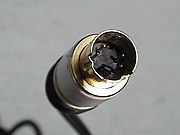
The previous post about the iPod got me wondering about the thousands of digital photos on my notebook hard disk and how I can display them onto my TV at a higher resolution than is possible with the iPod. So, on closer investigation of notebook I discovered that what I thought was a PS2 mouse port is actually and S-Video out port.


Wow, now that has possibilities.

As long as your TV has an S-Video In port then all you need is an S-Video cable to connect to your PC. If you have a cam-corder then you probably already have on.

The other thing you should do is connect your earphones port on your PC to the Audio In ports of the complimenting S-Video In port and pass the sound through to the TV system rather than in my case 2 pathetic little speakers on my notebook.

Firstly turn on your TV, select the input port that has the S-Video input, connect it to your PC's S-Video port and then turn on your PC.

Once booted up then right click on your desktop and select "Properties", then "Setting", then "Advanced" and you should have access to your Video Driver software. My Toshiba Tecra is an nVidia GeForce 6600. I have the option to select "Dual Screen" with the second screen being the TV. You need to select the video format the the TV accepts, which in my case is NTSC, PAL-N or PAL-M. You may have to play with settings to get it right for your particular TV-PC configuration.


So now to get some content. I have found the best and cheapest option is Google's Picasa, no.1 becasue it's free and no.2 because it does a really nice slide show but there is one trick. Go to Picasa's "Options", then "Slideshow" and un-check the "Do full-resolution slideshow" checkbox. TV's have a surprisingly low resolution of generally only 720 x 480 pixels. Therefore if your image is lets say 1600 x 1200 then it will not display on the TV.

I don't have a DVD player in the house apart from my notebook so we watch DVD's on the TV through the notebook.

I recently bought a subscription to Cricket Australia's Cricket Australia TV which gives me access to all games live for the Australian summer. Now I watch it on the TV laid up on the sofa with a beer in the hand rather than sitting at my desk watch my computer screen. Cricket is just not the same without beer!!

Basically whatever you can display on your computer you can display on your TV and it's impressive, especially digital photos on your TV in the comfort of your lounge room.

Wednesday, December 06, 2006

iPod - PC - TV

If you have found yourself here at this blog and have an iPod or are contemplating buying on then do yourself a favour and read this from start to finish. I am sure you will learn something or some things as I did.

My main reason for buying an iPod Video 60GB a couple of months ago was for entertainment when alone traveling or on a job site somewhere in the world. My original idea was to be able to fill it up with music and a few movies (dvd's?). I really had done no research whatsoever so when I arrived at the iPod shop I bought the unit itself, extended warranty and a silicone case. I went black as pictured below. (beautiful isn't it?)


I had no idea of it's full potential!! I must say that it's very impressive!!

So, the following ramble is split up into these sections:

1. The Original Setup
2. The FM transmitter
3. Adding Podcasts
4. Adding Photos
5. Adding Videos
6. Connecting your TV (I left the best till last)

1. The Original Setup
This is all pretty basic so most of you will just need to follow the instructions that comes with your iPod unless you want to do something special with your configuration.

Anyway I started by installing iTunes and adding all my music that accounted for about 10GB. I suggest that you use iTunes to copy your CD's onto your PC and that you configure iTunes to burn music in MP3 format.

Make sure that you sure connected to the Internet and when you enter a music CD then iTunes will then look for a database to import all song names and album artwork BEFORE you burn it.

2. The FM transmitter
After a few days of using the iPod I thought that I would check out the Apple Store to see what accessories are available. The first one to catch my eye was an iTrip FM transmitter pictured below that just clicks on to your iPod and allows you to tune any radio in to a selected frequency on the iTrip.


Now just think about that!! No need for a CD stacker because the iPod IS your CD stacker. My 10GB of music is well over 2,000 songs. So obviously I bought one.

Most important is to firstly check for an unused frequency on your radio and then tune in the iTrip to EXACTLY that frequency.

3. Adding Podcasts
Podcasts come in 2 forms, audio only and audio/video. I have subscribed to about 10 but there are thousands out there to be found. A couple of my favourites are:


And


More about this in section 6. Connecting your TV.

4. Adding Photos
Don't forget to put all your digital photos on your iPod either. You can configure iTunes to be manually or automatically updated. Your complete photo album in you pocket. More about this in section 6. Connecting your TV.

5. Adding Videos
This is the tough one. Videos will play in MP4, MOV or M4V formats so whatever you have got that is not in one of these formats then you need to encode. I have tried quite a few transcoder programs and the best so far is:

It is the fastest of the transcoders that I've tried, creates the smallest files, has less
sound to image latency and is easier on your CPU. It also has a predefined configuration for the iPod called "Digital Media Player" that sets up all parameters, etc to output the file into MP4 video format. So far I have transcoded the DVD format VOB, the Flash format FLV (YouTube for example), AVI, MPG, DAT and a few others. Just drag the file or files into the main window and click start. Once complete then just add the folder into iTunes and the next Sync with your iPod will add the videos.

6. Connecting your TV
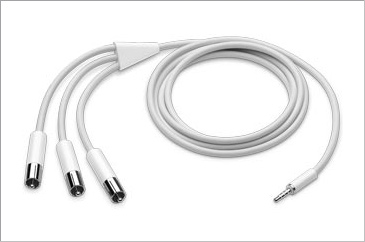
This is by far the best iPod feature that I was not aware of. I was checking out the Apple iTunes store for iPod accessories and noticed the Apple AV Cable for US$19 (AU$29).


This started my curiosity as here in Brazil the iPod and accessories are ridiculously expensive and I did not want to buy something that I would not use. So I thought that I would try my camcorder cable and found that the only difference is that a standard camcorder cable has the Video and Right Sound cable crossed over.

Tahdah!!!

I have a cable that works and I didn't pay a cent. Just connect it up to one of your TV's AV inputs. Most TV's these days have a connection in the front so it is so easy. You will have to set your iPod up to either PAL or NTSC output in the video settings. You may need to tinker a bit with the iPod setup but, don't worry, it works. By that way, I bought an extra camcorder cable here in Brazil for US$3 (AU$4).

So, now you might start to realize the possibilities. Instead of showing your photos to friends and relatives hunched around a computer you can now sit back in your lounge room and see your photos on your TV. Add some music or a playlist if you like to be played whilst running a slideshow.

Convert your DVD's before you go on a road trip, pack up your iPod and AV cable and plug it in to the TV in your hotel room.

Play your iPod music through your TV if you don't have external speakers.

Save your favorite YouTube clips and play them back on your TV.

Play your Podcasts on TV.

Etc, etc, etc, etc.

All good stuff.


I must say that the Apple AV Connection Kit looks very nice with a docking station and a remote. When I get back to Australia next that will be the first thing I buy.

Wednesday, November 08, 2006

Firefox 2

It's been here for a few weeks now.

I have been waiting for an automatic update notification but instead of getting a notification for 2 I got one for 1.5.0.8 so then I decided to update by a manual download.

And it is a nice, efficient and featured update.

Firefox 2
Enjoy!!

Tuesday, October 24, 2006

Skype - Onwards and Upwards

It goes on.

Check out the current data here!!

When I started using Skype there was peak users of 635,120 and 28,267,164 downloads.

Friday, October 20, 2006

Google Arsenal

Talking about my Google arsenal; let's see now!

I use frequently (generally daily):

1. Search
2. Blogger
3. Analytics
4. Calendar
5. News
6. Personalized Home Page
7. Gmail
8. Reader
9. Talk
10.Earth
11.Picasa

And they are all free!!

And here's Googles full list and then some more.

Googles Picasa


I must admit I have become a Google fan over the years (as have millions of others).

The latest addition to my Google arsenal is Picasa. I've been a long term user of ACDSee and finally I have had enough.

All I want is a simple picture viewer and editor with a nice and easy full screen slideshow fucntion.

Free Hugs

Have you have seen this???

Get the original here.

Now check out what is behind it:

It started here and then here and then here and then here and I hope it goes on.

And if you think that it has not made an impression then Google It or check out the amount of views at Youtube (3,615,980 views in 4 weeks).

Just a nice story don't ya think? Gives you hope in humanity......

By the way, the music's not bad either from The Sick Puppies.

Friday, May 19, 2006

Skype, Firefox, Thunderbird

It's interesting you know. I don't read my own blog much but I went back to do a review of my current template and content a few things really hit me:::::

This blog is now 16 months old. My "About Stuff In A Blog!!!" profile has not changed one bit. I still love and only use Thunderbird, Firefox and Skype for their fantastic compatibility, usability and security in their specific fields. And for the most part they are free!!

If there are any Internet Explorer or Outlook Express users reading this then do yourself a favour and CHANGE!!! Don't take my word for it, Google it and see what they are all saying!! Firefox has 349,000,000 hits, Thunderbird has 39,000,000, Skype has 284,000,000.

The power is in the numbers.

Edit: I just did a Google search on Microsoft and it returned 2,000,000,000 hits. If we consider the amount of products that they have then their % is not so high when it comes to browsers. It goes to show that the exposure of these fantastic new products really are starting to eat into the Microsoft margins.

None for one and free for all!!!!!!!!!!

Saturday, May 13, 2006

Wake Up USA!!

What the hell are you all doing there? You voted this absolutely dangerous idiot in for a second term and now you are really starting to pay.

Unfortunately your stupidity has a dramatic effect on the greater world; you know,,,,,,,,,,,,,, the one that exists outside the US of A.

You let him go to war in Iraq. A lovely situation now, hey?

You let him tap your telephone conversations. What will be the consequences?

You let him forget and neglect the economy and well being of US citizens. Again, what will be the consequences?

You let him .............................................

I see a very big similarity between GWB and the President in Fox's current series of 24. Both dangerous idiots shooting from the hip!!!!

Do we all have to put up with this for another 2 and a bit years? I guess so.

Think a little bit more carefully next time around, if not for your sake but for the good of the planet.

My Top 10 Things

1. Good food and drink. Thai is probably my favourite food but Chinese, a good Brazilian BBQ, Japanese (especially sushi and sashimi with loads of wasabi, soy and pickled ginger) and a simple Schnitzel (or milanesa) with lemon juice, mashed spuds and tinned peas are right up there also. Regards drinks well that's difficult. Here in Brazil we have a cocktail called Caipirinha that's pretty bloody good, a cold Corona with lemon is hard to beat, the first G&T sitting in Business Class is good too, cheap but good Argentinean reds are value for money, Swedish schnapps is a fun drink with friends during a mid-summer party (Akvavit, Aqvavit or Aquavit depending on where you come from, one of the most famous being Linie), etc..................

2. Staying in contact with friends and family. Need I say more?

3. Supermarkets. That's where most good food comes from.

4. Spending time in Brazil. Never a dull moment.

5. Spending time in Australia. Quite predictable but a beautiful country. It's a shame that most Aussies don't realize how good they've got it.

6. Working but not too much. And I am a little bit out of practise at the moment but I do enjoy it when I'm doing it.

7. Sport. I'm a true, all round sportsman; I can watch almost anything. Cricket, Australian rules, football, rugby, rugby league, tennis, sumo, formula 1, golf, snooker and pool just to name a few.

8. Computers and the Internet. Great time wasters.

9. Hot weather when I don't have to work in it.

10. Cold weather when I don't have to work in it.

Normally my wife would be at No.1 but we're in disagreement at the moment.

And by the way, how good is Wikipedia?

Saturday, May 06, 2006

Sorry But It's Skype Again

Firstly, is blogging under the unfluence a crime?

I hope not!!!

Skype 2.5 Beta is out and it's yet another quantum leap into the future.

The most fantastic improvement of a most fantasitic product is the ability to SMS.

Enjoy!!!

Wednesday, May 03, 2006

American Media, What A Joke

If John Howard or Tony Blair had this humerous political attack against them then it would be world headlines. But who saw this in US TV or world wide for that matter?

It absolutely amazes me how much of the policies, statements and actions of the grand government of the USA does not reach the people. It also amazes me as to the lack of media that ....................... I could go on..............

I'm quite sure that we outsiders (or aliens as the US call us) have a better understanding as to what is going on in that grand land than the insiders, i.e. citizens.

Many things go on in government and public life that we don't ever hear a word of. And the following is something that, for sure, never made it to CNN or BBC.

So................ This is a little link to a George W Bush roasting that REALLY happened.

Video 1
Video 2
Video 3

I'm sure the organizer of this event got the sack but thank you Mr. Organizer.

American Media, What A Joke!!! Thanks Fox!!!

Thursday, April 27, 2006

SkypeIn Australia

Today, or yesterday depending what part of the world you're in, SkypeIn Beta landed for Australia. That means that you can purchase a number in Austalia and even more specifically in area codes 02, 03, 07 and 08. The price is Euro10.00 for 3 months or Euro30.00 for a full year. And included in the price is Voicemail.

The service works like this; you give out your SkypeIn number to those that don't have a Skype account and they call you on that number. Skype then forwards that call to your computer if you are logged on. If you are not logged on then you can Call Forward it to a telephone number basically anywhere in the world.

Well done again Skype!!!!!

By the way, within the next 24 hours Skype will officially have 100 million registered user names. (edit: actually while I have been writing this the 100 M has been passed)

That doesn't convert into active users though. I have two user names but on actively use one. My step son has three but he only uses one. People that registered, tried it out and then never came back are also included in that number.

My guess is that there are something like 20 million active users. The daily peak usage generally occurs between 14-16 GMT at a bit over 6 million users online and growing.

Myself and a mate, Pete, started using this service back in Oct 2004 and on 19/10 there were 635,120 users online with a bit over 28 million downloads. There have now been in excess of 290 million downloads of the software.